How to Clip GTA VI for TikTok, Shorts and Reels
Grand Theft Auto VI (GTA VI, or GTA 6) launches on November 19, 2026, on PS5 and Xbox Series X|S. There is no PC version yet. That means a very large number of people will not play GTA VI this month. They will watch it on their phones.
Somebody has to cut those clips. This guide shows you what to clip, what gets a clip removed or demonetized, and how to turn one stream into a week of shorts.
What you need
- GTA VI footage: a recording from your PS5 or Xbox, or the link of a stream on Twitch, Kick or YouTube.
- Permission from the streamer, when the stream is not yours.
- A SendShort Professional or Business plan to cut the clips with AI. Long video to shorts is included From Professional ($29/month). See pricing.
How to Clip GTA VI (GTA 6): The Short Answer
To clip GTA VI, save your gameplay or copy a stream link, start each clip on the peak, crop it to 9:16 and add captions. Post 3 to 5 clips a day in launch week. Keep cutscenes, leaks and money glitches out, and keep graphic violence out of the first 7 seconds.
Launch week is the best week to clip GTA VI. Three things are true now and will not be true in a month:
- Every moment is a first. The first look at Vice City, the first chase, the first mission with Jason and Lucia. A first-time reaction can only happen once.
- More people want to watch than can play. The game is console only. The audience for clips is bigger than the player base.
- Search is empty. Nobody owns “GTA 6” plus a location, a car or a mission name yet. A clip with a plain, exact title can take that spot. The name of the game is GTA VI, but many people type “GTA 6”. Put both in the title or the description of your clip.
The five steps below are the full plan.
Step 1: Get the Footage
The game unlocks at midnight local time. Do the setup before that. You have three sources, and each one has a limit.
| Source | How to save it, and the limit |
|---|---|
| Your PS5 | Press Create, then save recent gameplay. The length is a setting, from 15 seconds to 60 minutes. Pick a long one before you play |
| Your Xbox | Xbox button, Capture and share, Record what happened. It saves the last 30 seconds by default. Raise it in the capture settings |
| A stream on Twitch, Kick or YouTube | Copy the link of the past broadcast. Twitch deletes past broadcasts after 7 days (14 for Affiliates, 60 for Partners). The Clip button stops at 60 seconds, in landscape |
Two settings save a lot of clips:
- Twitch storage. Turn on Store past broadcasts. If it is off, there is no recording to clip. Our guide shows how to make clips from Twitch.
- Facecam. Keep it in one corner. A split layout can then put your face on top and the gameplay below.
Pro Tip: Turn the in-game radio down or off before you record. A licensed song can bring a Content ID claim. A claim is not a strike, but the revenue goes to the label.
One rule for clippers: a stream belongs to the streamer. Clip it with their permission, or inside a clipping campaign that pays per 1,000 views. Our guide to Whop clipping shows how those campaigns work.
Step 2: Pick the Moments
Raw gameplay rarely carries a short. A person does. The best GTA VI clip is usually a voice or a face at the exact second something goes wrong.
| Clip this, and how long | Why it works |
|---|---|
| First-time reactions 10 to 20 seconds | They can only happen once, and people search for them now |
| A chase or a heist that goes wrong 15 to 30 seconds | It has a start, a mistake and an ending |
| A detail, an easter egg, a map location 10 to 20 seconds | People save it and search for it later |
| Physics and funny glitches 8 to 15 seconds | They loop well |
| GTA V against GTA VI 20 to 40 seconds | It starts an argument in the comments, and it still works after launch week |
| A story with commentary 30 to 60 seconds | The talk carries it |
The lengths are working rules, not measured data. Change them when your own numbers tell you to.
Then cut each clip the same way:
- Start on the peak, not the setup. If the crash is at second 20, the clip starts at second 19.
- Put the hook in the first 1 to 2 seconds. If the setup matters, put it in the on-screen title.
- Add captions. Many people watch with the sound off.
- End on the reaction. Cut one beat after the laugh or the shout, so the clip loops.
- Name the thing in the title. “Lucia’s first car chase goes wrong” beats “this is insane”. Our guide to YouTube Shorts hooks has more patterns.
Step 3: Know What Gets a Clip Removed
Two sets of rules decide if your clip stays up and earns.
- Rockstar. Rockstar’s video policy says fans can post gameplay footage. It also lists what Rockstar takes down.
- YouTube. The advertiser-friendly guidelines decide if a video earns ads. They cover Shorts, titles and thumbnails too.
| Skip this | What happens |
|---|---|
| A cutscene on its own, an ending, a plot reveal | Rockstar removes it as a spoiler. A cutscene inside a longer playthrough with your commentary is fine |
| Footage from before launch, or a leak | Rockstar removes it, "regardless of how the game was obtained" |
| In-game TV shows or comedy performances on their own | Rockstar removes it |
| Ways to cheat online: money glitches, exploits, mod menus | Rockstar removes a video that shows or promotes them. A funny physics glitch is fine |
| Graphic violence in the first 7 seconds or in the thumbnail | YouTube gives it no ads |
| A montage built around killing, for example a crowd of NPCs | YouTube gives it no ads |
| Strong profanity in the title or thumbnail | YouTube gives it no ads |
YouTube says “unedited gameplay violence occurring after the first 7 seconds” can earn ad revenue. So a normal shootout is fine. Open on the reaction or the setup line, and let the violent beat land after second 7.
Rockstar wrote its policy for non-commercial use. In practice, monetized gameplay videos stay up, but nobody can promise that. Read the policy yourself before you build a channel on it.
Step 4: Turn One Stream into a Batch of Clips
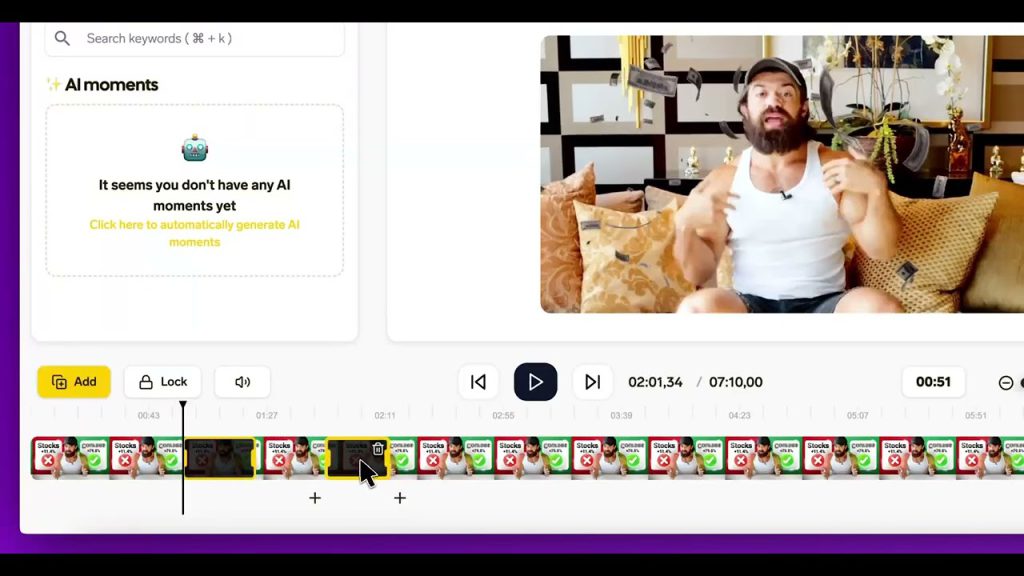
The fastest way to clip a GTA VI stream is to paste its link into SendShort. The AI picks the moments, crops them to 9:16 and adds captions.
By hand, each clip needs a cut, a 9:16 crop that follows the action, captions and an export. That is fine for one clip. It does not work for 3 to 5 a day. This is the job that SendShort does:
- Add the footage. Paste a link from YouTube, Twitch or Kick, or upload a file. A link can be up to 4 hours long, so a launch-night stream fits. A file can be up to 3 hours and 2 GB.
- Choose the output. Set the number of shorts and the caption style. The AI reads the transcript and picks the moments. One long video can give 25 or more shorts.
- Fix the frame. Use the split or the reaction layout for a facecam plus gameplay. Use the fit layout when the whole frame matters, for example a wide view of the map.
- Check the first second. Trim the start so the clip opens on the peak. Add an AI hook title, or write your own.
- Translate the captions. The launch is global. SendShort has captions in 100+ languages, so one good clip can go out again in Spanish or Portuguese. See how to translate subtitles.
- Post. Schedule to TikTok and YouTube from SendShort. For Instagram Reels, export the file and post it.
Where the AI Helps and Where It Does Not
SendShort finds moments from what people say. It works best on a stream with commentary, a reaction or a voice chat. On silent gameplay there is nothing to read, so set the start and the end by hand in the editor. The captions, the framing and the scheduler still save you the time.
Pro Tip: On Professional and Business you can also give the whole job to an AI agent. SendShort works with Claude, ChatGPT and Grok Bot. See how to make shorts with Claude.
Step 5: Follow a Launch-Week Plan
The plan assumes 3 to 5 posts a day.
| Day | What to do and what to post |
|---|---|
| Before launch | Set the capture length and the stream storage. Turn the radio down. Get permission from the streamers you clip. Test one 9:16 export. Post nothing, and do not post leaks |
| Day 1 (Thu 19 Nov) | Play or watch the first hours. Post first-time reactions as soon as each one is ready. Speed beats polish |
| Day 2 | Cut the launch-night stream. Post chases, failed missions and physics |
| Day 3 | Explore. Post discoveries, with the place name in the title |
| Day 4 | Post GTA V comparisons, plus a second cut of your best clip with a new hook |
| Days 5 to 7 | Read your numbers. Post more of the type that people watched to the end, and translated versions of your best clips |
If your Twitch recordings expire after 7 days, cut the launch-night stream before day 7.
The clippers who win launch week are not the best editors. They are the ones who still post on day six.
Create your first GTA VI short
FAQ: GTA 6 Clips
1. When does GTA 6 come out?
GTA VI (Grand Theft Auto VI, also written GTA 6) launches on November 19, 2026, on PS5 and Xbox Series X|S. Rockstar has not announced a PC version.
2. Can I post GTA 6 clips on TikTok and YouTube?
Yes. Rockstar’s video policy lets fans post gameplay footage. It removes leaks, cutscenes posted on their own, in-game shows posted on their own, and videos that promote cheats or exploits.
3. Can GTA 6 clips earn ad revenue on YouTube?
YouTube says unedited gameplay violence after the first 7 seconds can earn ads. Graphic violence in the first 7 seconds or in the thumbnail earns none. The same rules cover Shorts.
4. How long should a GTA 6 clip be?
Use 8 to 30 seconds for pure gameplay. Use 30 to 60 seconds when commentary carries a story. Start on the peak in both cases.
5. Why did my GTA 6 clip get a copyright claim?
The usual cause is a licensed song from the in-game radio. A Content ID claim is not a strike, but the revenue goes to the label. Turn the radio down before you record.
6. Can I clip the GTA 6 stream of another streamer?
Only with permission, or inside a clipping campaign that covers that streamer. The stream belongs to the streamer.
7. Does an AI clipper work on GTA 6 footage?
It works best when people talk: commentary, a reaction or a voice chat. SendShort picks moments from the transcript, so on silent gameplay you set the start and the end by hand. AI clipping is included From Professional ($29/month).
Thanks a lot for reading this,
David Ch
Head of the Editing Team at SendShort
About the author
David leads the editing team at SendShort. With this help, the team delivers the latest guides on using your favorite social media apps and creating short-form content.